RepoGraph AI v1.0 is live on the VS Code Marketplace. Install free

Understand any codebase
in minutes, not days

RepoGraph AI scans your workspace, maps every file relationship, and gives you an interactive dependency graph, AI summaries, and a live Q&A — all on your own API key.

RepoGraph AI — Workspace Analysis
$ repograph.analyzeLocal()
Scanning workspace: my-next-app
Found 142 source files across 18 directories
Skipped: node_modules, dist, .next, lockfiles
 
Building dependency graph...
312 import edges resolved across all files
Most connected: lib/auth.ts (in:18 out:6)
 
Generating AI summary via Groq...
Tech stack detected: Next.js · TypeScript · Prisma · Tailwind
Architecture: App Router with layered server components
 
Analysis complete. Q&A is ready — ask anything.
20+
Languages supported
5
AI providers
0
Data sent to our servers
MIT
Open source forever
Features

Everything you need to navigate
an unfamiliar codebase

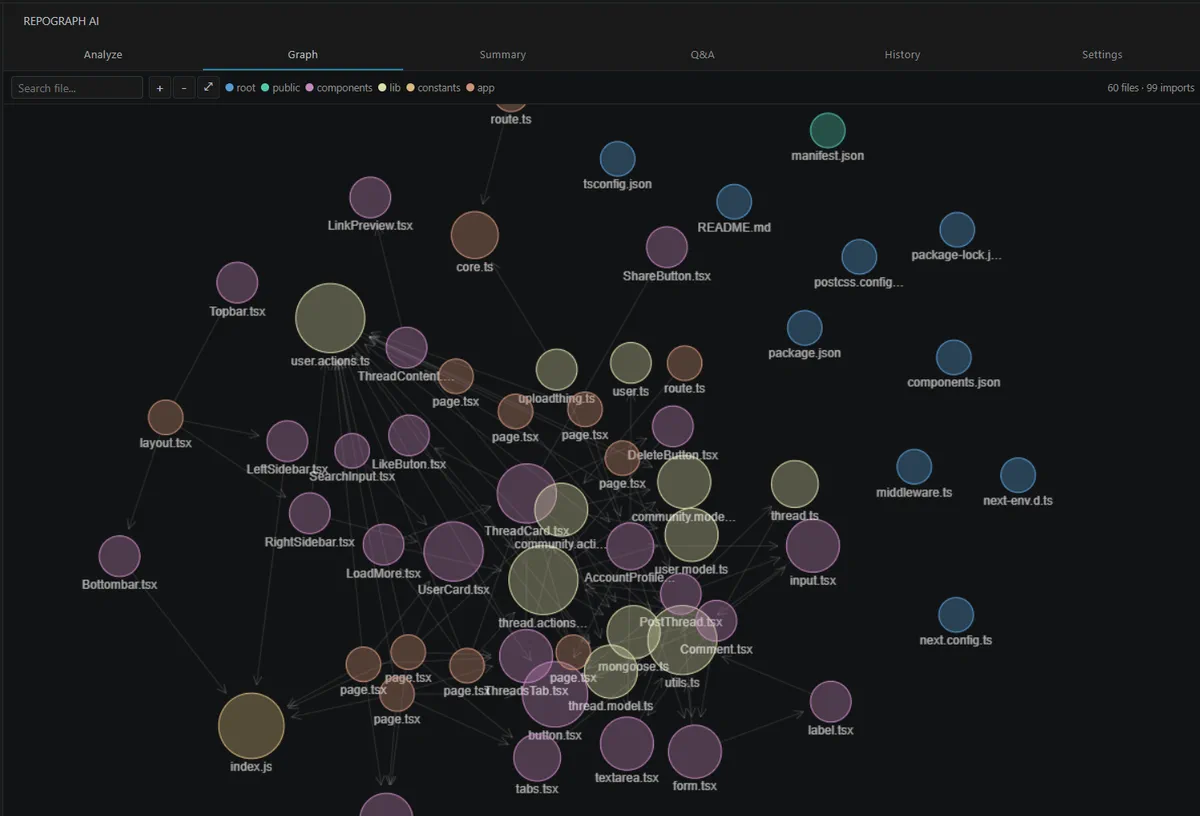
Visual Dependency Graph
Interactive force-directed canvas graph showing every file and its import connections. Click nodes for details, double-click to open the file directly.
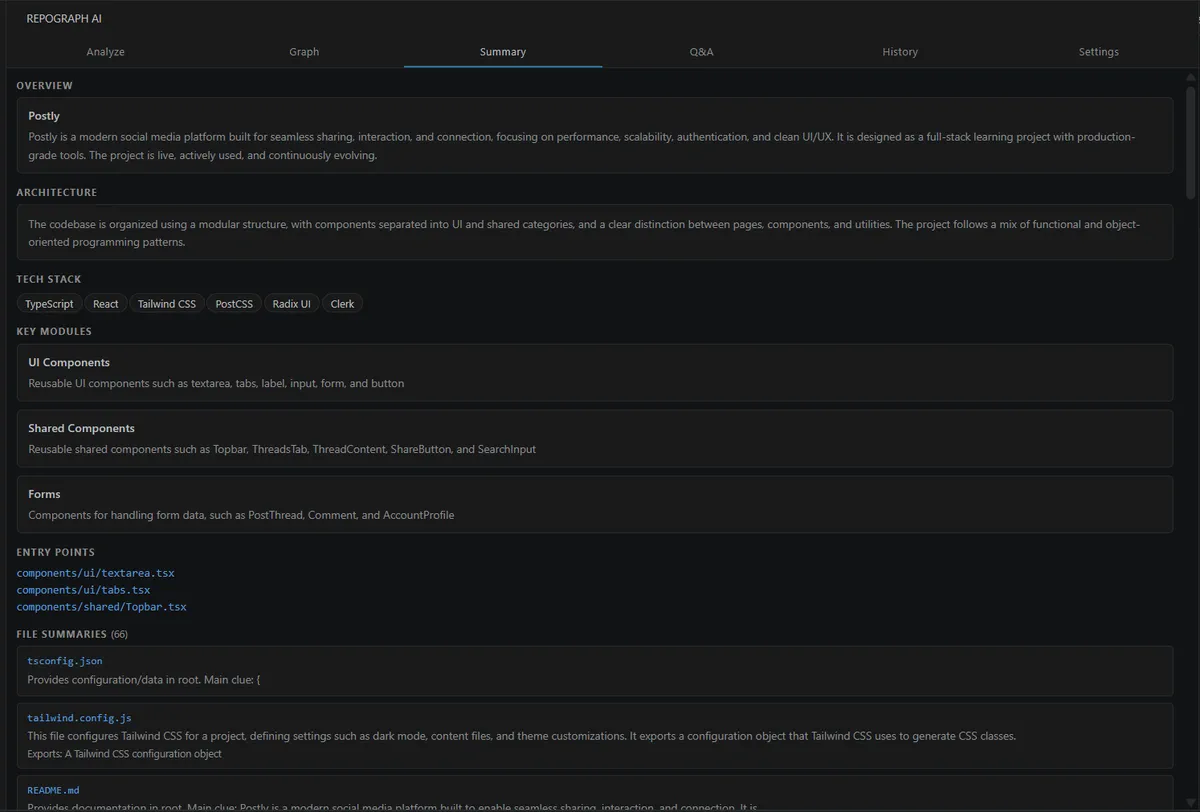
AI File Summaries
Every key file gets a plain-English explanation of what it does, what it exports, and what it depends on. No more guessing where things live.
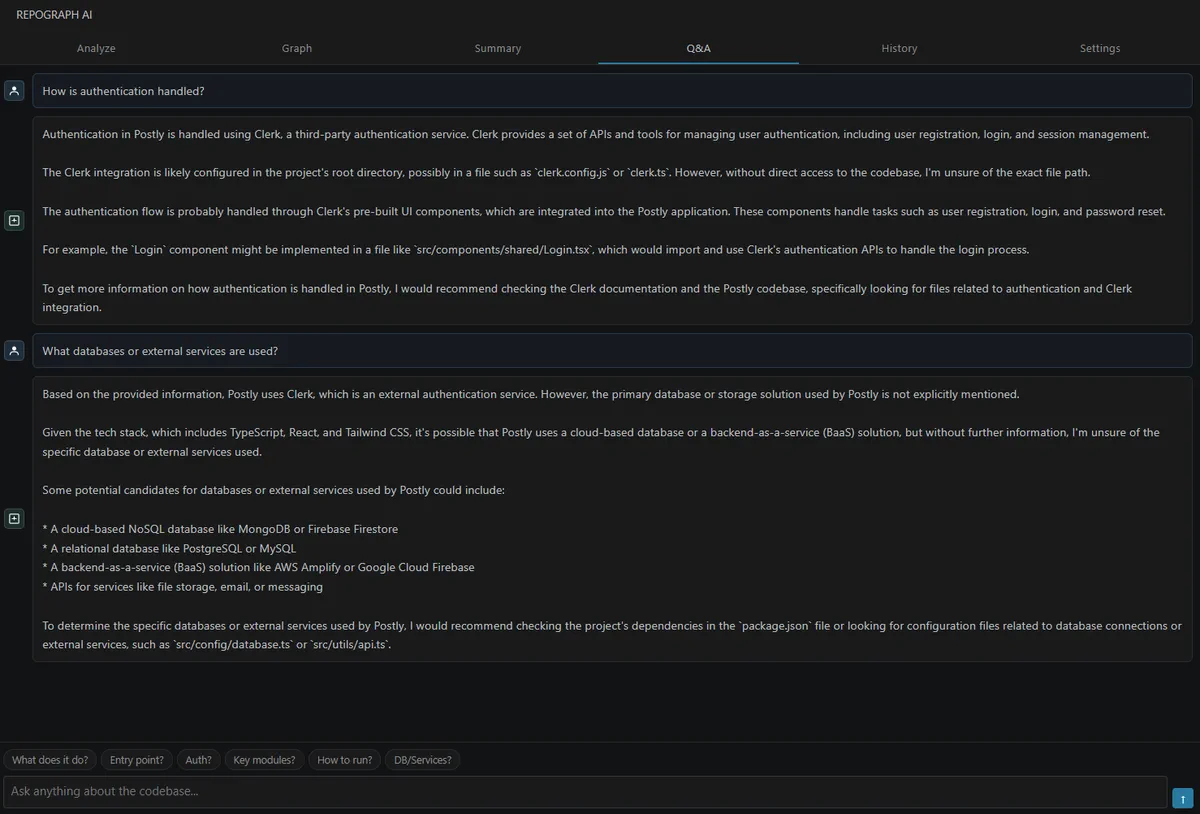
Codebase Q&A
Ask anything in plain English. The AI has full repo context and answers with specific file references. Multi-turn conversation with history.
5 AI Providers
Groq, Ollama, Gemini, Anthropic, OpenAI. Type any custom model name. Switch providers anytime without re-analyzing.
Analysis History
Every analysis saved locally per workspace. Load past analyses, compare graphs across refactors, delete when done.
Smart Filtering
Auto-skips node_modules, dist, build, lockfiles, minified files, and generated code across all languages. Only your source code gets analyzed.
Screenshots

See it in action

RepoGraph AI dependency graph showing file connections
RepoGraph AI summary panel with AI-generated overview
RepoGraph AI Q&A panel answering codebase questions
How it works

Four steps from zero
to full understanding

The entire pipeline runs locally. The only external call is to the AI provider you configure.

01
Scan the workspace
Reads all source files. Automatically skips node_modules, dist, build outputs, lockfiles, minified and generated code across all languages.
02
Build the dependency graph
Extracts every import per language, resolves relative and alias paths, builds a node-edge map of the entire codebase.
03
Generate AI summaries
Sends batches to your AI provider. Returns a repo overview, architecture description, tech stack, and per-file explanations.
04
Ask anything
The Q&A agent has full graph, summary, and file context. Multi-turn conversation with history so questions build on each other.
WorkspaceScanner — reads source files
GraphBuilder — extracts imports, builds edges
AI Provider — your key, your choice
RepoSummaryAgent — overview + architecture
FileSummaryAgent — per-file explanations
QAAgent — multi-turn codebase Q&A
VS Code Sidebar — graph, summary, Q&A
AI Providers

Your key. Your choice.

Start free with Groq or run 100% offline with Ollama. All providers support custom model names.

Provider Cost Default Model Best for
Groq Free tier llama-3.3-70b-versatile Best starting point. Fast, generous free limits.
Ollama 100% Local llama3.2 Complete privacy. No internet after setup.
Google Gemini Free tier gemini-1.5-flash Good free quota. Fast and accurate.
Anthropic Claude Paid claude-haiku-4-5 Highest quality summaries and answers.
OpenAI Paid gpt-4o-mini Reliable, cheap at mini tier.

All providers support custom model name input.

Supported Languages
TypeScript
JavaScript
Python
Go
Rust
Java
Kotlin
C
C++
C#
Ruby
PHP
Swift
Vue
Svelte
Astro
GraphQL
Prisma
SQL
Shell
Privacy

Your code never
leaves your machine

RepoGraph AI has no backend. No server, no account, no database, no usage tracking. The only network request is to the AI provider you configure.

Encrypted key storage
API keys stored in VS Code's SecretStorage using OS keychain. Never written to disk in plaintext.
Zero telemetry
No analytics, no crash reports, no usage events. The extension works fully offline except for AI calls.
Open source and auditable
Every line of code is public on GitHub. Read it, verify it, fork it.
Data flow
Your workspace
VS Code only
Graph + summaries
Local storage
File snippets
AI provider only

Our servers
do not exist
Analytics
none
Account required
never
Installation

Up and running in three steps

STEP 01
Install the extension
Search RepoGraph AI in the VS Code Extensions panel and click Install. Or use the command line.
ext install kaushalendra.repograph-ai
STEP 02
Add your API key
Click the RepoGraph icon in the activity bar, open Settings, pick a provider, paste your key. Start free with Groq.
Get a free Groq key
STEP 03
Analyze your workspace
Open a project, go to Analyze tab, click Analyze Workspace. Graph and summaries ready in one to two minutes.
Ctrl+Shift+P → RepoGraph: Open Panel

Built by

Kaushalendra Singh
Kaushalendra Singh
Software Engineer · AI Systems

Stop reading files.
Start understanding code.

Free. Open source. No account required.